 Pawcket
Credit control without the spreadsheets
Pawcket turns your aged debt report into a clear chase list for today. Log calls, promises and disputes, send letters and statements, and see who's a risk, all in one place on your own PC.
Windows 10 and 11 · Full app free for 14 days · No card needed to try
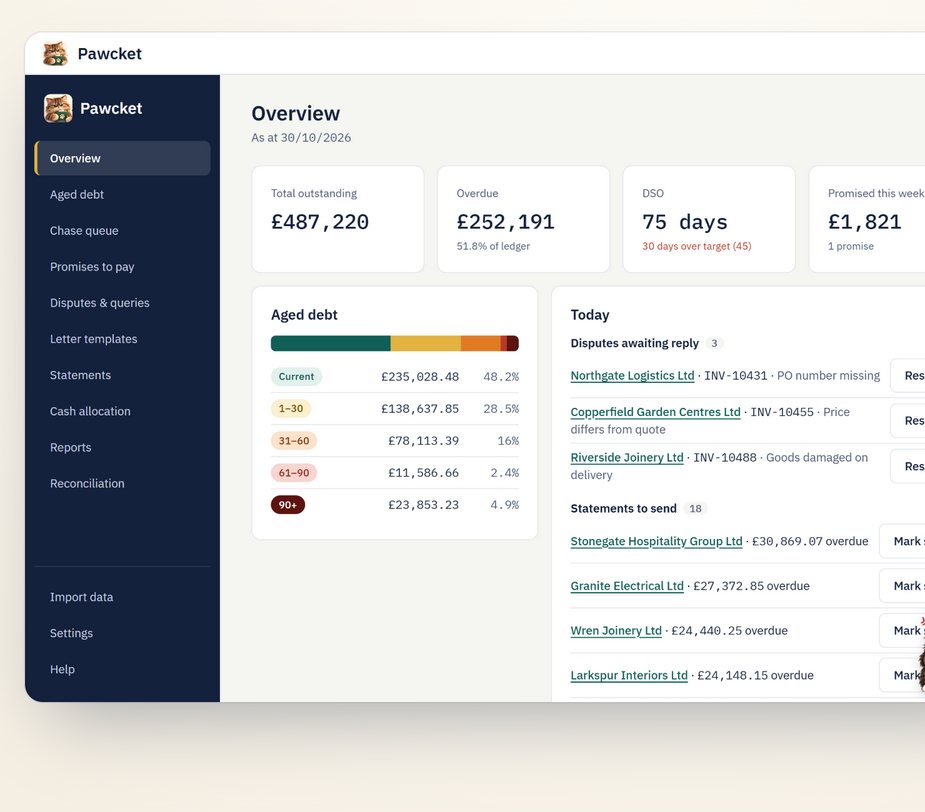
From spreadsheet chaos to a calm chase list
Pawcket was made by a credit controller who lived the "before". Drag the line to see the difference.
BeforeSorting and colouring the spreadsheet to work out who to ring first.
AfterToday's list is ready when you open Pawcket, biggest and oldest first.
BeforePromises buried in emails and sticky notes.
AfterEvery promise tracked, and you're reminded the day it's missed.
BeforeCopying figures into a Word letter, one customer at a time.
AfterA letter with your logo and the right invoices in one click.
BeforeMonth-end statements done by hand, one by one.
AfterEvery statement drafted in one go, ready to check and send.
Everything you need to get paid on time
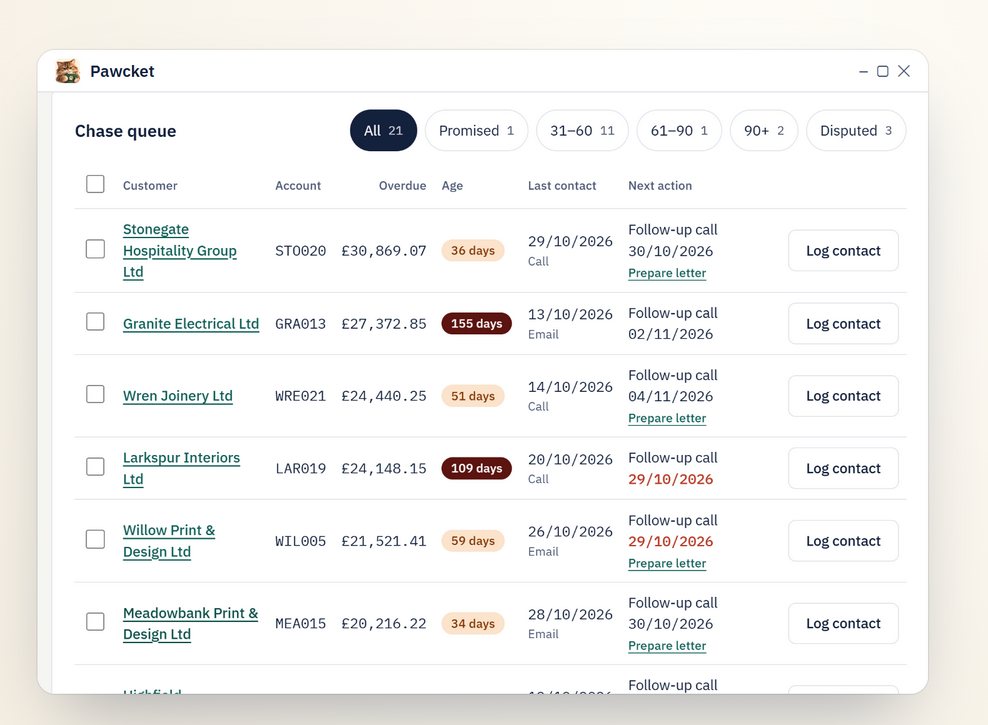
Know exactly who to chase today
Import your aged debt and Pawcket lines up every overdue customer, biggest first, with the next step from your own chase workflow.
- Imports from your accounting system or Excel
- Log a call, promise or dispute in seconds
- Promises and disputes pause chasing for you
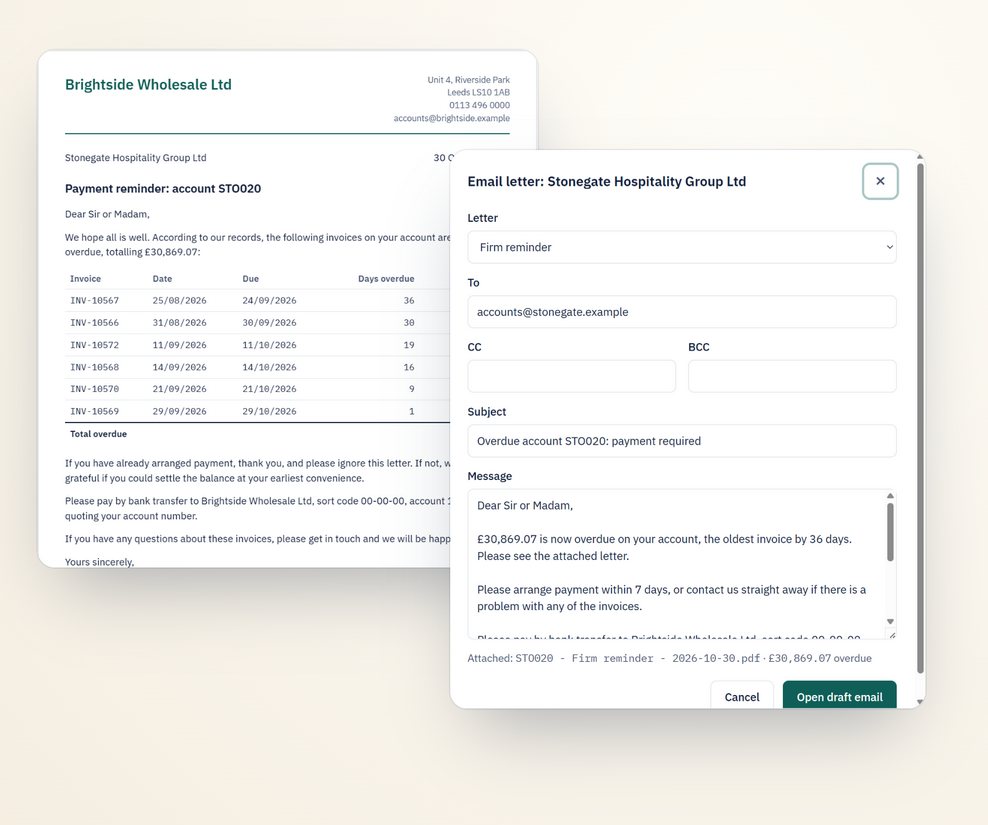
Chase letters, ready to send
Friendly, firm and final templates with your logo, signature and bank details. Pick a tone and see the letter Pawcket writes for you.
- Classic Outlook, Microsoft 365, or an email file
- Every email opens as a draft for you to check first
- Change the wording to suit your company
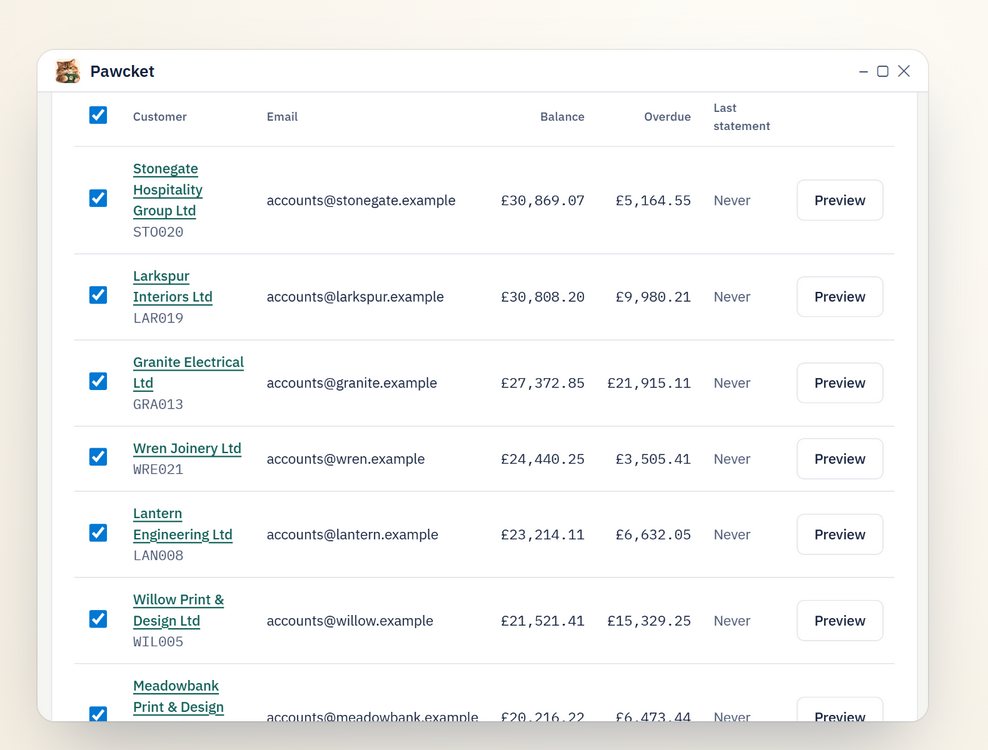
Month-end statements in one go
Choose a date, tick the customers, and Pawcket emails each one a statement of account as a PDF.
- Aged at the date you choose
- Anyone already sent one is left unticked
- Logged in each customer's history
See who's a risk before it's too late
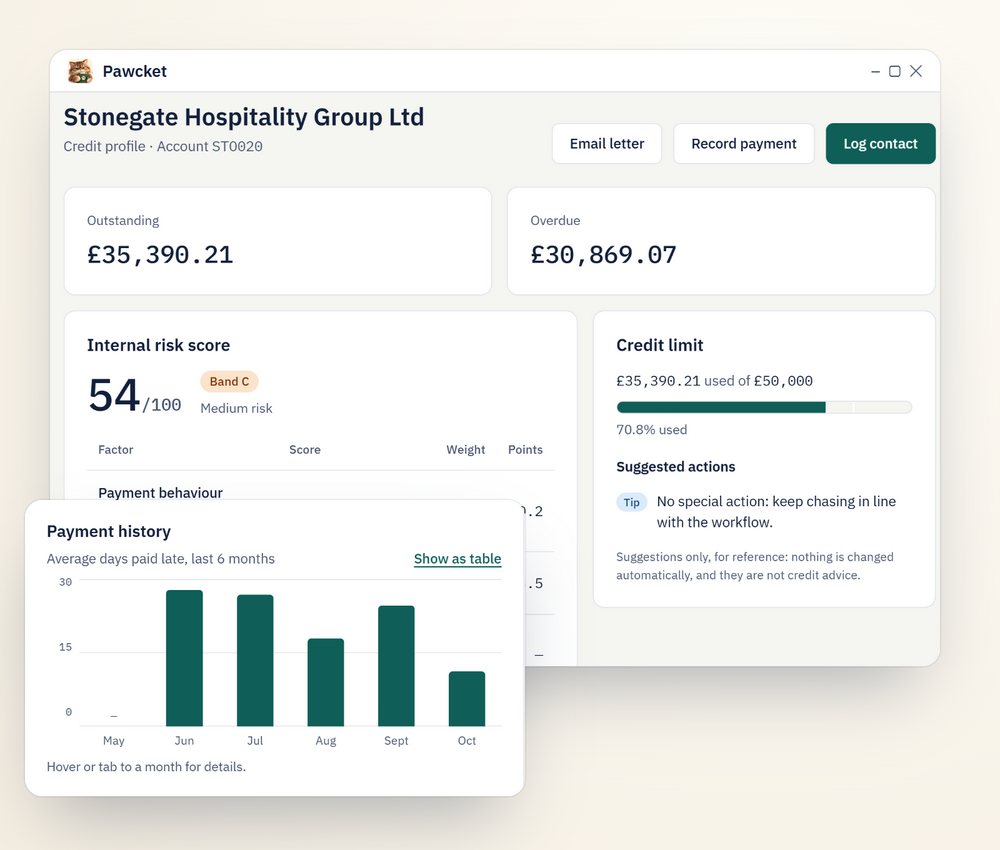
Each customer gets an internal risk score from how they pay, how much is overdue, broken promises and Companies House filings.
- Payment history chart for the last 6 months
- Credit limit use with suggested actions
- Late accounts, director changes and insolvency flagged
The score is a guide from your own records, not credit advice or a credit rating.
Reports your manager will love
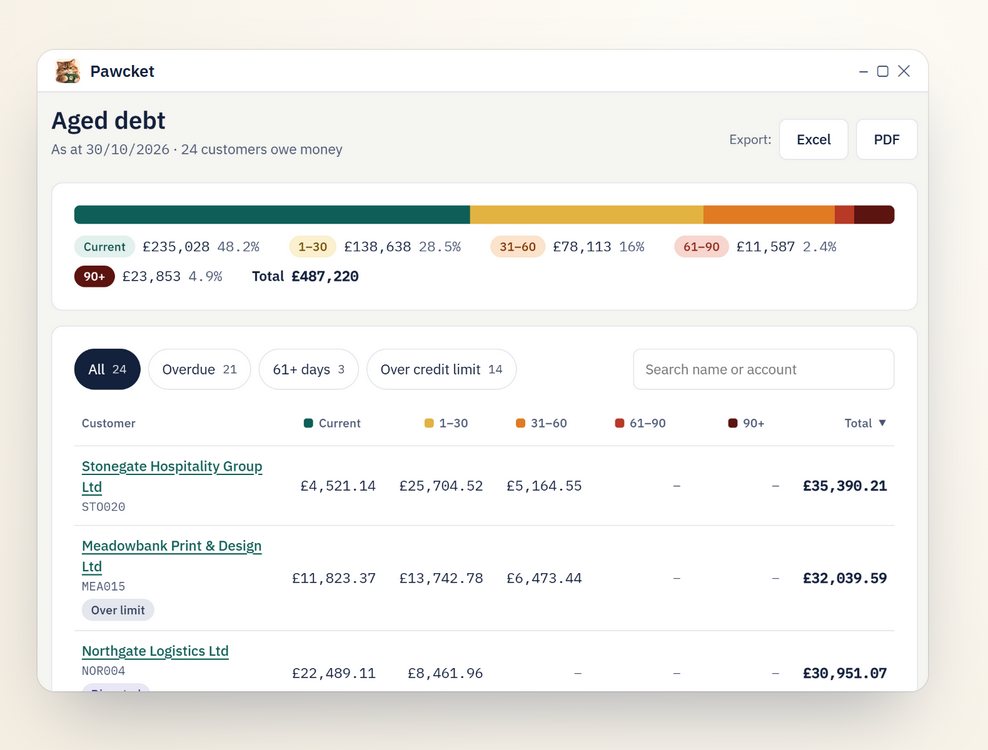
See the whole ledger by age, and export tidy reports to Excel or PDF with your company name and logo.
- Aged debt with filters and search
- Cash received, promises, disputes and contact activity
- Reconcile with your ledger and see what doesn't agree
A little cat that keeps you going
Penny watches how much of your ledger is overdue. Click her moods to hear what she says.
She celebrates every payment, purrs when today's chasing is done, and can be muted or switched off any time.
Works with the report you already have
Export your aged debt (or aged receivables) report and Pawcket matches the columns for you. Nothing is saved until you've checked it.
"Being checked" means the import is built but not yet tested with a real export. Any system works through the Excel template, and we can set up an import for yours.
Fits the way your team works
Set Pawcket up your way in a few clicks. Need more? We can tailor it for you.
Change it yourself, any time
- Letter and email wording, logo, signature and bank details
- Chase steps and timings, from courtesy email to stop account
- How the risk score weighs payment history, overdue debt and more
- Your own extra columns when you import
- Penny's mood levels, or switch her off
Tailored for your company
A report your finance director asks for every month. An import from your own system. A letter layout or a step that matches your credit policy. Tell us what you need and we'll quote for it.
- Custom reports and exports
- Imports from other accounting systems
- Workflow and letter changes
- Help setting up your team
Every request is quoted individually. No obligation.
Your data stays on your PC
Customer names, balances and notes are your business. Pawcket never sees them.
No cloud, no tracking
There's no online account. Everything is saved in a file on your own computer.
Automatic backups
A backup every day, and before every update. Add a copy to OneDrive or a USB stick.
Only what's needed goes online
Company numbers to Companies House, your licence key to Gumroad, and the emails you choose to send. Nothing else.
Read the full privacy notice.
Questions
What do I need to run Pawcket?
A Windows 10 or Windows 11 PC (64-bit). There is no Mac version. You don't need administrator rights to install it.
How does the free trial work?
Download Pawcket and use every feature free for 14 days. No card is needed. If you buy a licence, enter the key in Settings › Licence and carry on: everything you've done in the trial is kept.
How many computers can I use it on?
One licence covers 2 computers, for example your work PC and a laptop. Each computer keeps its own data.
Can Pawcket be tailored for my company?
Yes. Letters, chase steps, risk scoring and imports can all be changed in Settings. For anything more, such as a custom report or an import from your own system, ask us for a quote.
Does Pawcket send emails without me knowing?
No. Every email opens as a draft for you to check first. Sending a batch without checking each one is a setting you have to switch on, and even then Pawcket shows you how many emails and how much money they cover before anything goes.
Which email programs does it work with?
Classic Outlook on your PC, or Microsoft 365. With any other email program, Pawcket saves the email as a file that opens in your usual email app.
Will it change anything in my accounting system?
No. Pawcket only reads the report you export. Your accounting system stays the record of what's owed; Pawcket is where you do the chasing.
Can I try it without using my real data?
Yes. The welcome guide has a Try with demo data button that fills Pawcket with made-up customers so you can explore safely.
How do I get updates?
Download the new version from Gumroad and install it over the old one. Your data is kept, and Pawcket makes a backup first.
Is the risk score credit advice?
No. It's an internal guide worked out from your own records and public Companies House information. Always use your own judgement and your company's credit policy.
Try Pawcket free for 14 days
Every feature included. No card needed. Your data stays on your PC.
Hayley and Jack So, the family behind Pawcket